For the person who got stuck with the minutes
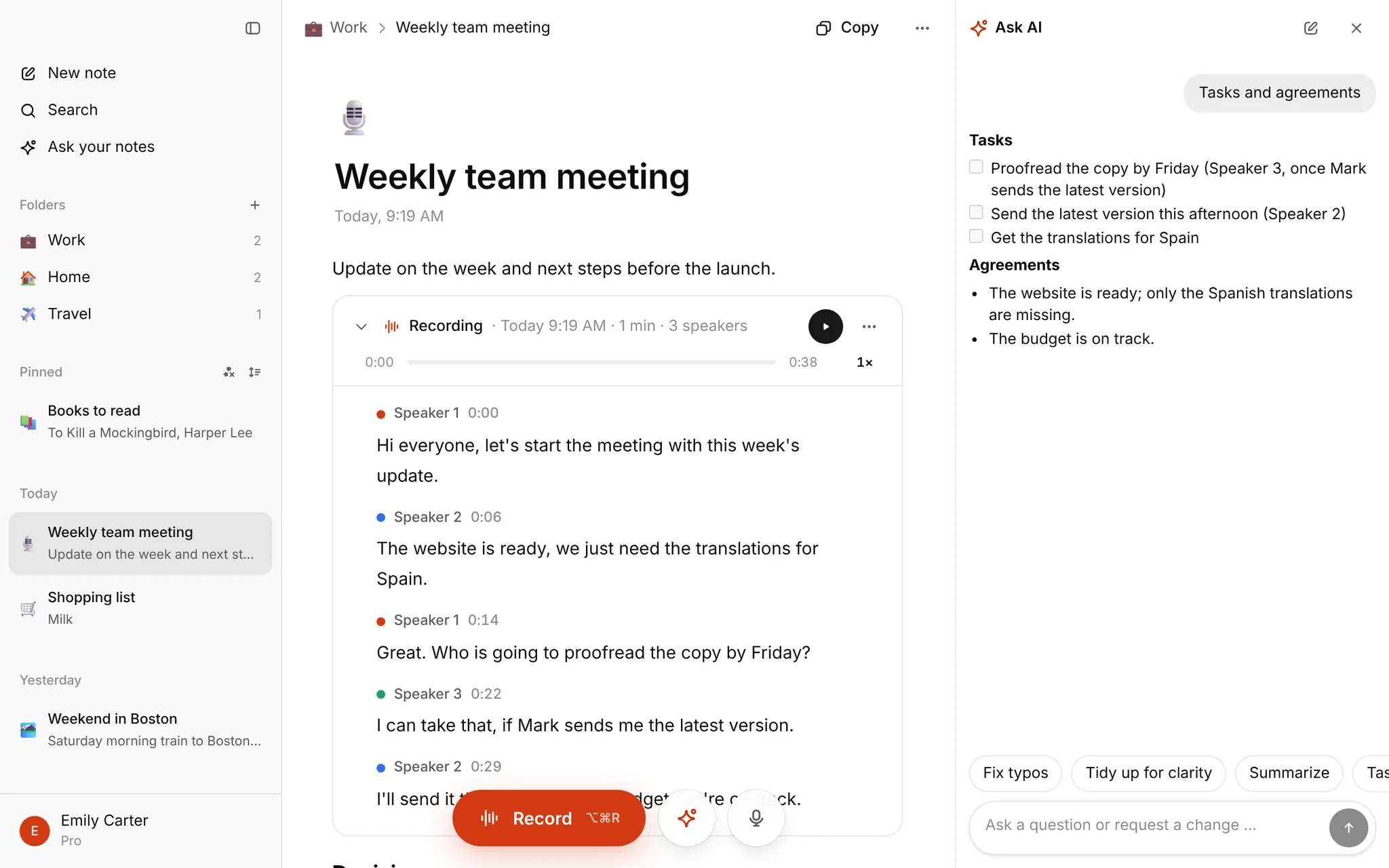
Boards, HOAs, clubs, PTAs, church councils: someone has to write it down, and that person can't also take part. Record the meeting on a laptop or phone placed on the table, and write the minutes afterwards from the transcript.
How it works
- Open My notes, sign in with Google and create a note.
- Press Record before the meeting starts. Allow the microphone when asked.
- Stop at the end. The transcript appears in the note in a few minutes, with speaker labels and times.
- Open the AI panel and ask: "Draft the minutes. List decisions and motions with the vote results, and action items with who and by when."
- Check the draft against the transcript (tap a sentence to hear it), then copy it into your minutes document.
There is no bot that joins Zoom or Teams. For an online meeting, import the recording Zoom or Teams saves.
Templates and guides
Pick the one that matches your group. Each page has a filled template you can copy and a Word file to download.
- Meeting minutes template: the all-purpose one, with motions and action items tables
- Examples of meeting minutes: a nonprofit board, an HOA and a PTA, filled in
- Board meeting minutes: motions, votes, quorum, conflicts of interest, executive session
- HOA meeting minutes: plus what an HOA secretary does
- Club secretary duties: the job, and a club minutes template
- AGM minutes: annual general meetings and committee minutes
- PTA meeting minutes: a short template for parent groups
- Church and parish council minutes: church council, parish council and vestry
- How to take meeting minutes: the full guide, step by step
What it doesn't do
- It doesn't join online meetings by itself.
- The transcript comes after you stop, not live.
- Speakers are numbered (Speaker 1, Speaker 2). Put the names into your request.
- There is no Word or PDF export. Copy the minutes, or download the note as Markdown.
- The minutes are a draft from Ask AI, not a finished document. Names, numbers and vote counts deserve a second look.
What it costs
Nothing is for sale right now. Every account that signs in has Pro free until January, with up to 10 hours of transcription a month and no card. Without an account, the homepage transcribes one file up to 30 minutes.
Recording and privacy
Tell people the meeting is being recorded; some places require consent. Recordings and transcripts stay in your account until you delete them. ElevenLabs (US) turns the audio into text and Google Gemini reads the note for the AI panel, both only to process your request.
FAQ
Is a transcript the same as minutes? No. A transcript is every word. Minutes are the decisions and actions. Use the transcript as your source.
Does it work with a few people around a table? Yes, with the device near the group. Quiet rooms and one speaker at a time give the cleanest result.
Longer than two hours? Record it all. Long files take a little longer. See the voice recorder page.